
Remotion on the GPU: exporting video with 4 times less CPU
Article updated by Pedro Henrique Lahr
remotion-gpu is an open tool that exports Remotion videos using the computer's graphics card. On a real 75 second video, the processor worked for 112 seconds instead of 460: 4.1 times less. That matters because on a server that also runs websites, the processor is the thing in short supply, while the graphics card sits idle most of the time.
What is Remotion?
Remotion is a tool for making video by writing code. You build each scene like a web page, and it opens a hidden browser, takes a picture of the page for every frame and joins the pictures into a video. Think of a flip book: a 75 second video at 30 frames per second has more than 2,000 pages.
It works, but it is hard work for the computer. The one doing it all is the processor (the CPU, the part of the computer that does the general math).
Where does the work go?
We measured a 15 second piece of a video with a person filmed talking. Almost none of the effort was the scene code:
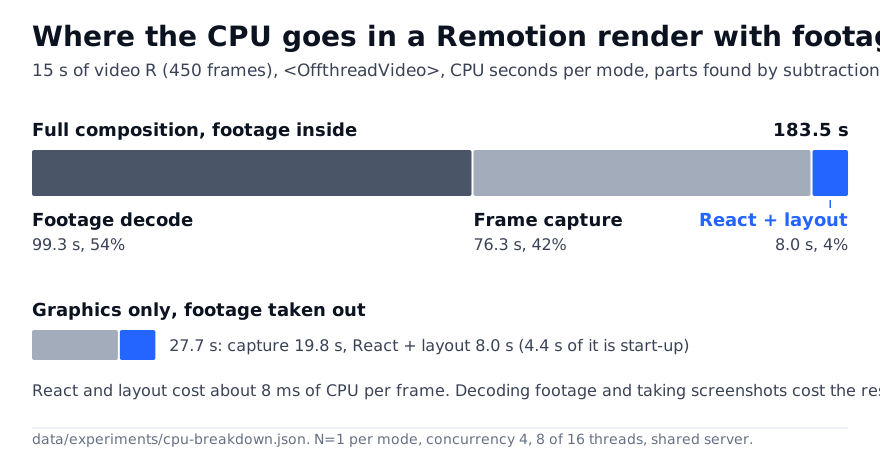
- 54% went into opening the filmed footage, frame by frame.
- 42% went into taking the picture of each frame.
- Only 4% was the scene code.
So making the scene code faster helps very little. The footage and the pictures are what cost.
How does remotion-gpu fix it?
The GPU is the graphics card: a part built to handle images very fast. The idea was to give it the image work and leave the browser with only what it does well.
The video is split into two layers, like a clear sheet laid over a photo:
- At the bottom, the filmed footage. The card opens it, crops it, places it and encodes the result. The browser never touches it.
- On top, the graphics (text, captions, drawings). The browser still draws these.
One more step: when the graphics layer does not change from one frame to the next, the tool reuses the previous frame instead of drawing it again. In the measured video, 29% of graphics frames were reused. On a still slide, 80%. In a scene with captions moving all the time, only 2%.
How much better is it?
On the whole 75 second video, compared with Remotion's own best way of using the card:
- CPU: 460 s before, 112 s after. 4.1 times less.
- Waiting time: 2.3 times faster.
- Quality: mean SSIM of 0.978. SSIM is a score from 0 to 1 that says how alike two images are; 1 means identical.
A tip for anyone using Remotion today: just turning on Remotion's own GPU options, with nothing of ours, already cut 65% of the CPU on a 15 second piece.
Everything was measured on one machine (an AMD Ryzen 7 7700X processor and an NVIDIA RTX 5090 card) that was busy with other services. That is why the paper says how many times each test ran.
What did not work?
The paper also lists what failed, so nobody else loses time on it:
- Making the browser open the footage on the card: the browser crashed.
- Capturing only the part of the screen that changed: slower, and not identical.
- Storing the graphics in video formats with transparency: it cost more than it saved.
Frequently asked questions
Do I need a graphics card to use remotion-gpu? Yes. It was built and measured with an NVIDIA card on Linux.
Does it help with every video? It helps most when the video has camera footage inside. Without it, the gain is small or none, and Remotion's normal path may be better.
Does the video look different? Very little. The mean similarity score (SSIM) was 0.978 against the Remotion render, on a scale where 1 means identical.
Full paper
This post is a summary. The full paper, with the method, the tables and every test, is at doi.org/10.6084/m9.figshare.34875540.
How to cite: Lahr, Pedro Henrique. Exporting Remotion videos on the GPU: a layered render, measured against Chrome. Figshare, 31 Oct 2026. https://doi.org/10.6084/m9.figshare.34875540